
Text-to-Pay Setup for Small Business
What Will You Accomplish With Text-to-Pay?
Does Text-to-Pay Replace Other Tools We Already Use?
Who Stands Behind This Kind of Automation?
What Do You Need Before You Start?
Do I Need New Software to Accept Payments by Text?
Do Customers Need Special Equipment to Pay by Text?
How Do You Choose A Payment Processor?
What should a small business compare before switching processors?
Does consolidating tools actually save money?
How Do You Create Your Payment Links?
Where Do These Payment Conversations Live?
Can Business Owners Test the Automation First?
How Do You Send Your First Text Payment Request?
What happens after the customer receives the text?
Do we need special software to send the request?
How Do You Automate Reminders And Follow-Ups?
Why Do Text Reminders Work Better Than Email Or Phone Calls?
Can Automated Follow-Up Handle More Than Payments?
How Do You Track Payments And Measure Results?
Why does payment speed matter so much right now?
What results can we expect to measure?
What Mistakes Should You Avoid When Texting Customers?
A small-business text-to-pay setup requires three steps: choose a payment processor that offers SMS invoicing, link it to a merchant account, and send customers a secure payment link via text. SERTBO builds this directly into its all-in-one automation platform, combining payments with leads, reviews, and follow-up so invoices get paid faster.
Key Takeaways
Text-to-pay solutions reduce late payments and administrative work for small businesses like SERTBO.
SMS payments improve cash flow by enabling customers to pay faster and more conveniently.
Contactless and mobile payment methods are becoming the norm for modern customer transactions.
Text-to-pay strategies help businesses accept payments online, in person, and internationally without barriers.
What Will You Accomplish With Text-to-Pay?
Small business owners gain a direct line to customer payments as soon as they adopt text-to-pay. Customers receive a message, tap a link, and complete payment without leaving their phone. We built our systems around this exact mechanic because removing friction in collections changes how quickly revenue actually arrives.
Speed is the first outcome worth measuring. Businesses that put Text to Pay for Your Small Business strategies into practice typically get paid faster. Cash flow improves as a direct result. Fewer delayed invoices mean fewer awkward follow-up calls and less time spent chasing balances that should have cleared weeks earlier.
Does Text To Pay Replace Other Tools We Already Use?
No, it consolidates them. Our platform places payments, texts, and customer follow-up inside one application. Owners stop logging into five disconnected systems just to confirm a payment landed. We designed this structure specifically for teams that don't have a dedicated billing department.
Here's what changes once text-to-pay runs inside that single system:
Invoices go out as text messages instead of emails that sit unread
Payment confirmation triggers automatic follow-up, not manual checking
Staff spend less time reconciling accounts across separate tools
Customers pay from wherever they already are: their phone
Who Stands Behind This Kind of Automation?
We've built business automation and related services for small and medium businesses. That history matters because payment technology changes fast, and a platform without a long track record poses greater risk for owners who depend on steady cash flow. Our experience shapes how we design every text-to-pay workflow we deploy.
The accomplishment, ultimately, is simple: money moves faster, administrative drag shrinks, and owners reclaim hours once lost to manual collections.
What Do You Need Before You Start?
Three things matter before launching text-to-pay: a clear view of the tools already in use, a plan to avoid adding another subscription, and confidence that customers can actually receive a text. We walk clients through each of these before touching a single setting.
Most small businesses we meet already run a patchwork of software: a website chat widget, a separate texting app, an email platform, a review manager, a scheduler, and an invoicing tool. cite-2 None of these systems talk to each other. Layering Text to Pay for Your Small Business on top of that stack only adds another login, another monthly fee, and another gap where a payment notification slips through the cracks.
Do I Need New Software to Accept Payments by Text?
No. A sixth subscription is not a prerequisite for collecting payments this way. We built our platform so leads, texts, reviews, payments, and follow-ups live in one app, removing the setup complexity that usually stalls these projects before they start.
Do Customers Need Special Equipment to Pay by Text?
No special equipment is required on the customer side. Nearly every customer already carries a cell phone capable of receiving and paying a text invoice. The barrier to adoption sits with the business, not the buyer.
Before rolling this out, we recommend confirming the following:
Audit current tools. List every app currently used for communication, scheduling, and billing.
Identify overlap. Flag which tools could be consolidated into a single workflow.
Confirm customer reachability. Verify that mobile numbers on file are current and consent is documented.
Handling these three steps first keeps the rollout simple and avoids bolting a payment feature onto an already overloaded system.
How Do You Choose A Payment Processor?
A strong payment processor supports text-to-pay directly, allowing customers to settle invoices via a simple SMS link. We built our platform around this requirement. Collections should never depend on a customer finding a web portal or digging up a credit card.
Most processors on the market already support text-based payments through pay links. These links connect to an existing phone system or texting service. A business rarely needs to replace its current setup from scratch. That said, not every processor packages this feature cleanly, and some require add-on tools just to send a payment request by text.
We take a different approach. Our platform consolidates the tools a business would otherwise juggle separately for payments and communication. Rather than stitching together a merchant processor, a texting app, and an invoicing tool, our clients run everything through one system built for Text to Pay for Your Small Business.
What should a small business compare before switching processors?
Compare total monthly software costs first, not just transaction fees. Many businesses pay for several disconnected subscriptions, a chat tool, a texting line, an invoicing app, and these costs add up quietly every month.
Here is what we recommend evaluating:
Integration: Confirm the processor sends pay-by-text links through the business's existing phone system or texting service.
Consolidation: Check whether the platform replaces separate tools instead of adding another subscription.
Cost impact: Calculate current software spend against a single consolidated platform.
Does consolidating tools actually save money?
Yes, and the savings compound over time. Clients who moved from a fragmented software stack to our consolidated platform have saved on subscription costs.
That figure reflects eliminated tools, not reduced service. Fewer logins mean fewer missed payments and less administrative time spent reconciling separate systems.
How Do You Create Your Payment Links?
Creating a text-to-pay link starts with creating a bill in our platform and sending it directly to a customer's phone. The customer then opens the message and completes the purchase from their mobile device, turning a single text into a finished transaction.
We built our workflow around three core steps:
Build the invoice. Enter the service details, amount due, and customer phone number into our system.
Attach the payment link. Our platform converts the invoice into a secure link that opens a mobile checkout screen.
Send and track. The text goes out immediately, and our team monitors the thread until payment clears.
Where Do These Payment Conversations Live?
Payment requests rarely stand alone; customers often ask questions before and after paying. We bring SMS, Facebook, Instagram, and Google Chat into one unified inbox. A payment link request sits next to every other conversation a customer starts with us. Billing questions, confirmations, and reminders stay organized in one screen instead of scattered across four separate apps.
Can Business Owners Test the Automation First?
Yes, and we encourage it before committing to a full rollout. Texting our business number produces the same instant, intelligent reply a customer would receive, giving owners a firsthand look at the automation behind Text to Pay for Your Small Business. That hands-on preview shows exactly how a link moves from invoice to payment before it ever reaches a real customer.
Setting up a payment link takes only a few minutes once invoice details are entered correctly. The unified inbox keeps every exchange visible from the first message to the final receipt, which is especially important during busy collection periods. We treat the mechanics of getting paid as part of a larger customer conversation, not a transaction bolted onto the side of the business.
How Do You Send Your First Text Payment Request?
Sending a first text payment request requires a working text-to-pay setup within a business messaging platform. We built SERTBO around this exact workflow. Our team, based in Fresno, California, helps small businesses configure and launch their first payment request without guesswork.
Follow these steps in order:
Confirm the customer's mobile number is accurate and saved in the system.
Draft a short message with the amount owed and a secure payment link.
Send the text and monitor delivery status.
Record the payment once the customer completes it through their phone.
Follow up automatically if the request goes unanswered after a set window.
That last step matters more than owners realize. We configure automatic text-back functionality so a missed call never falls through the cracks. The system replies instantly, keeping the payment conversation alive instead of letting the lead go cold.
What happens after the customer receives the text?
The customer taps the link and pays directly through their phone, no app download or account login required. This simplicity is the entire point of Text to Pay for Your Small Business: fewer steps mean fewer abandoned payments and faster deposits.
Do we need special software to send the request?
Yes, a connected messaging and payment platform is the prerequisite before any request goes out. We set up that connection for clients so texts, payment links, and confirmations run through one system rather than three disconnected tools.
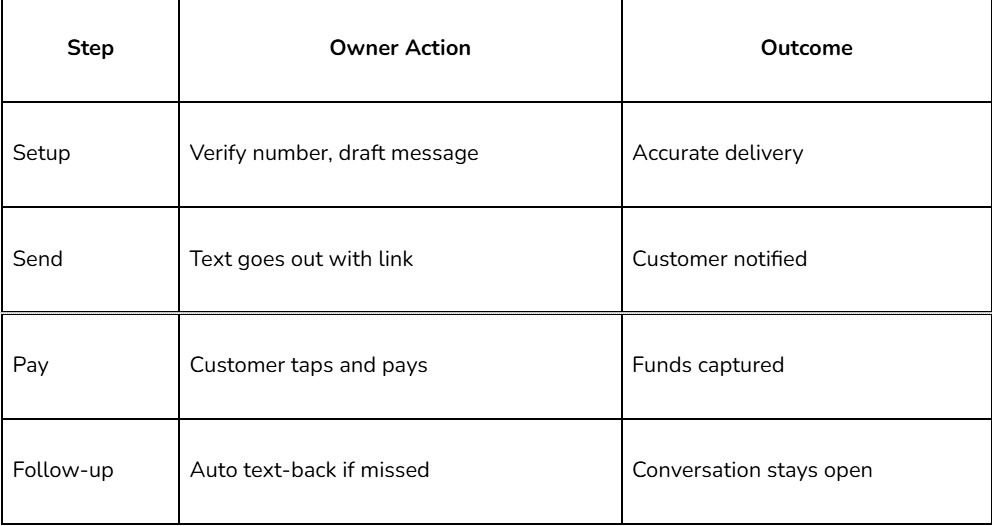
We treat every missed response as a signal, not a dead end, and we build the follow-up logic accordingly.
How Do You Automate Reminders And Follow-Ups?
We automate reminders and follow-ups by consolidating all payment nudges, review requests, and status updates into a single connected system, rather than juggling separate apps. This consolidation protects cash flow directly. A payment reminder sent two days late can push a customer's bill to the bottom of their inbox for another week. Small business owners lose hours each month toggling between a scheduling tool, a texting platform, and a payment processor that never share data.
Why Do Text Reminders Work Better Than Email Or Phone Calls?
Texting outperforms traditional outreach because customers already prefer it. According to [How Text to Pay Gets Your Business Paid Faster and On](https://www.messagedesk.com/blog/pay-by-text-with-text-to-pay)-time, 76% of customers prefer texting with businesses, and text messages reach open rates as high as 98%. Those numbers mean a reminder sent by text gets seen almost immediately. A voicemail or email often sits unopened for days.
Here is how we structure an automated reminder sequence for a small business:
Trigger the first reminder automatically once an invoice or appointment reaches its due date.
Send a follow-up text 48 to 72 hours later if payment is not received.
Escalate unresolved balances to a direct message from the business owner's own device.
Log every response automatically, so no customer gets double-billed or double-reminded.
Running this sequence from one app replaces the duct-taped combination of reminder tools many small businesses rely on. A missed sync between calendar and invoicing software quietly drops customers through the cracks. cite-2
Can Automated Follow-Up Handle More Than Payments?
Yes, the same text-to-pay workflow extends naturally into reputation management. Once a payment closes, the system can automatically trigger a review request, and owners can read and respond to it directly on their phones without logging into a separate dashboard. For any business building Text to Pay for Your Small Business into daily operations, that single thread connecting billing and reputation turns one transaction into a lasting customer relationship, rather than a closed file nobody revisits.
How Do You Track Payments And Measure Results?
We track payments by keeping every transaction in a single, unified system rather than scattered across multiple apps. A single dashboard shows who paid, when, and through which channel, so nothing slips through the cracks. We built our platform around this principle because disconnected tools make measurement guesswork rather than strategy.
Fragmented systems hide the real cost of collections. When text messages, invoices, and payment records are stored in separate places, calculating the true turnaround time becomes nearly impossible. We solve this by housing conversations, reminders, and payment confirmations together. Business owners see the full collections story at a glance.
Cost clarity matters just as much as visibility. We give clients a transparent monthly cost for the entire text-to-pay workflow, not a maze of line items. Knowing the exact platform cost each month lets us calculate return on investment with confidence, instead of estimating hidden fees buried across multiple vendor bills.
Why does payment speed matter so much right now?
Late payments rose 32% in 2020, according to the source "How Text to Pay Gets Your Business Paid Faster and On-time," leaving many small businesses unable to pay suppliers or even themselves. That spike underscores why we treat payment speed as a core metric, not an afterthought. Tracking how quickly invoices convert to cash reveals whether Text to Pay for Your Small Business is actually closing that gap.
What results can we expect to measure?
Results vary by business, but the upside is real. The same source reports that some small businesses saw 80% reductions in monthly accounts receivable after adopting text-based payments and reminders. We recommend measuring these indicators monthly:
Average days to payment
Percentage of invoices paid within 24 hours
Outstanding accounts receivable balance
Platform cost versus hours saved on manual follow-up
What Mistakes Should You Avoid When Texting Customers?
Three mistakes undermine payment texting programs: relying on generic auto-replies, running six disconnected tools, and skipping text-to-pay entirely. We see small business owners fall into each of these traps, often without realizing the cost until invoices go unpaid for weeks.
The first mistake is treating automation as a replacement for people. Generic bot replies feel robotic and erode trust, especially when it comes to money. We pair real staff with AI so every payment message stays accurate. Personal, rather than handing the whole conversation to a script.
The second mistake is operational, not technical: juggling separate apps for texting, invoicing, and payment collection. When leads, texts, reviews, payments, and follow-up live in six different subscriptions, something always falls through the cracks. A missed follow-up on an unpaid invoice costs real revenue. We built our platform around one login specifically to close that gap.
The third mistake is the simplest to fix: not offering the option at all. Only 4% of small businesses currently provide this payment method, according to Gravity Payments' coverage of a Weave survey, even though customers increasingly expect it. That gap represents lost cash flow for every business still relying on mailed invoices or phone calls.
Is it risky to send payment requests by text?
Risk comes from inconsistency, not the channel itself. Mixing automated bots with no human oversight creates confusing, error-prone exchanges that frustrate customers and delay payment.
How often should a business follow up by text?
Text to Pay for Your Small Business works best with a brief, consistent cadence rather than scattered one-off messages. A single reminder near the due date, followed by one polite nudge if payment lapses, keeps communication clear without overwhelming the customer.
FAQ
What are the three steps to set up text to pay?
Choose a payment processor offering SMS invoicing, link it to a merchant account, then send customers a secure payment link via text. SERTBO builds this directly into its all-in-one automation platform.
Does text to pay require adding new software?
No, a sixth subscription is not necessary. SERTBO's platform brings payments, texts, and customer follow-up into a single application, eliminating the need for separate billing tools.
How does text-to-pay improve cash flow for small businesses?
Customers tap a link and pay without leaving their phone, removing friction from collections. This speed reduces late payments and cuts down on manual follow-up calls.
Conclusion
In closing, implementing text-to-pay functionality transforms how your small business collects payments and engages customers. By selecting the right platform, configuring your payment workflows, and training your team, you establish a streamlined system that reduces transaction friction and builds customer loyalty. This modern payment approach positions your business for sustainable growth while meeting evolving consumer expectations for convenience and accessibility.
