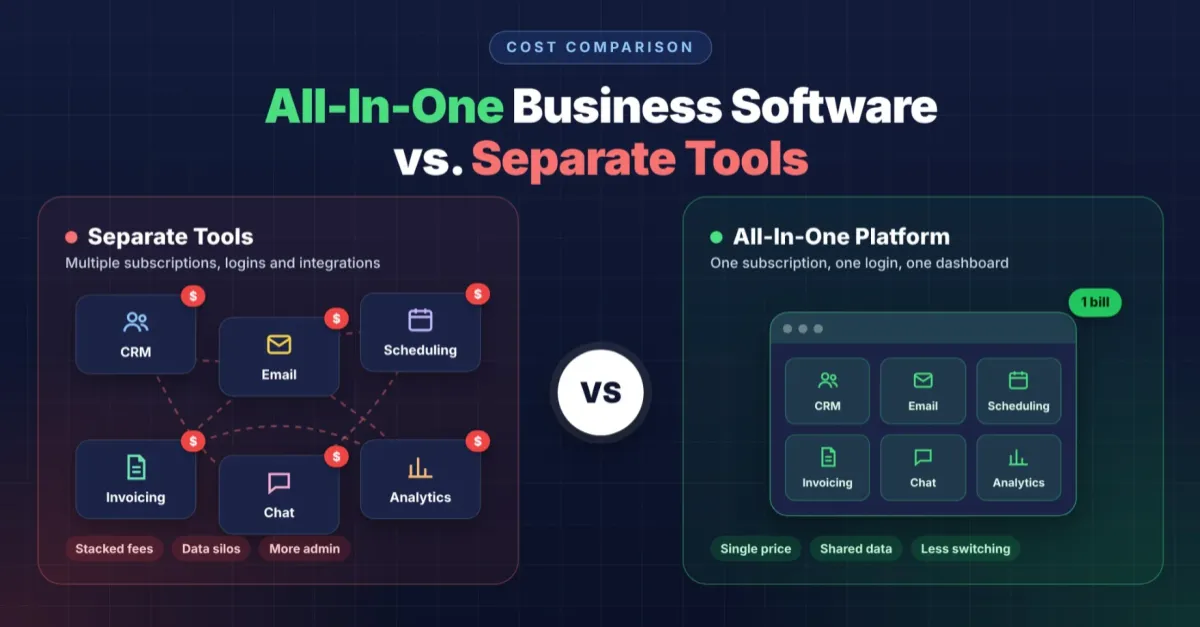
All-In-One Business Software Cost vs. Separate Tools
Why Are Businesses Rethinking Their Software Stacks?
Is It Cheaper to Buy One Tool for Each Job?
What Does a Separate-Tools Stack Really Cost You?
Is an all-in-one platform actually cheaper than separate tools?
What Exactly Is All-in-One Business Software?
How Does an All-in-One Platform Compare to a Stack of Separate Tools?
What Does "All-in-One" Actually Include?
How Does All-in-One Business Software Cost Compare?
Why does consolidation lower the total bill?
What does one login actually save a business?
What Hidden Costs Come With Stitching Tools Together?
Does a Scattered Toolset Affect Customer Communication?
What Is the Real All-in-One Business Software Cost Comparison?
When Does Consolidation Not Make Sense?
How Do We Know If Consolidation Fits a Business?
Who Helps Business Owners Make This Call?
How Does SERTBO Simplify the Cost Equation?
What Does SERTBO's Platform Actually Replace?
Who Manages the Automation Behind the Scenes?
What Should You Do Before Switching Platforms?
Consolidated platforms typically cost less than separate tools because a single subscription replaces several: CRM, email automation, invoicing, and scheduling fees are combined into a single bill. Separate best-of-breed stacks like Salesforce plus standalone email tools add integration costs and multiple monthly charges. We help businesses compare total stack spend against one unified automation system before deciding.
Key Takeaways
All-in-one platforms consolidate multiple tools into one system, reducing the number of separate subscriptions your business manages, as discussed in What Exactly Is All-in-One Business Software?.
Separate tools create data gaps between systems, forcing your team to manually transfer information across 5+ different applications, contributing to What Hidden Costs Come With Stitching Tools Together.
Single-platform solutions eliminate duplicate billing cycles, streamlining cost tracking into one monthly or annual invoice for your entire operation (see How Does All-in-One Business Software Cost Compare?).
Integrated systems keep your complete customer record in one place, preventing critical business information from scattering across disconnected software.
Why Are Businesses Rethinking Their Software Stacks?
Fragmented software stacks drain budgets and hide customer data across too many logins. Six or more disconnected subscriptions now run a typical small operation. A single connected system would do the job instead. We built our approach around that gap because scattered tools create more cleanup work than they save in efficiency.
Consider what a typical service business actually pays for in a given month. A chat widget handles the website. A separate texting service sends appointment reminders. An email platform runs campaigns, a review manager chases testimonials, a scheduler books jobs, and an invoicing app collects payment. None of these systems talk to each other. Staff re-enter the same customer details five or six times a day.
Is It Cheaper to Buy One Tool for Each Job?
Buying the single best tool for every function looks like the smarter move on paper. Each app does its one job well, and teams assume that specialization beats compromise. The catch surfaces later: every tool holds only a fragment of the customer record, and someone has to stitch those fragments together by hand.
That stitching work rarely has an owner on a small team. Small teams are already running thin, and gluing six systems together becomes an unpaid, unofficial job that nobody signed up for. We see all-in-one business software cost differently once hidden labor is factored in. The real comparison isn't tool-by-tool price tags; it's the time lost and data lost every time software fails to connect.
Separate subscriptions multiply monthly billing and renewal dates
Disconnected tools force duplicate data entry across every customer touchpoint
Nobody owns the job of keeping the "glue" between apps from breaking
What Does a Separate-Tools Stack Really Cost You?
Separate software stacks hide costs beyond the monthly subscription total. Each specialized tool goes deeper into one job, but running several tools together adds an integration tax on top of a stack of subscriptions. That tax shows up as staff hours spent reconciling records, manual data entry between systems, and dropped leads when platforms fail to sync. Small and medium-sized business owners rarely budget for that hidden labor, yet it compounds every month.
Consider what a typical service business carries on its books. A website chat tool, a texting service, an email platform, a review manager, a scheduler, and an invoicing app rarely communicate with one another, even though each bills separately. cite-1 Many small businesses simply can't absorb five or six separate subscriptions covering CRM, invoicing, project management, and marketing at once. Something gets cut, usually the integration work that would make the stack behave like one system.
Is an all-in-one platform actually cheaper than separate tools?
Often, yes. We've found clients who consolidate onto a single platform commonly save more than they would with separate software subscriptions. cite-1 That gap comes from eliminating redundant tools and the staff time once spent stitching them together, which is the real all-in-one business software cost story: not the sticker price, but the total operating cost.
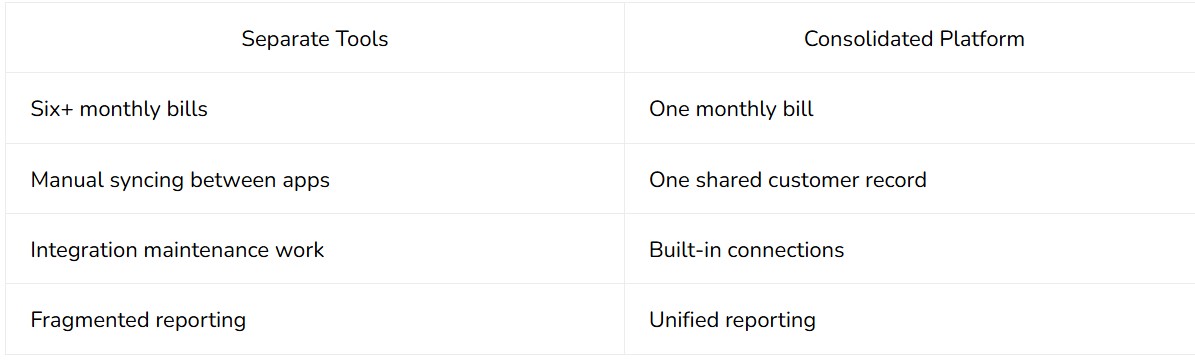
Operations managers evaluating consolidation should weigh the subscription count against the hours lost to reconciling disconnected systems. The sticker price of each individual tool looks reasonable in isolation; the stacked total, plus the integration labor, rarely does. For a full breakdown of the tradeoffs, refer to What Does a Separate-Tools Stack Really Cost You?.
What Exactly Is All-in-One Business Software?
An all-in-one platform combines several related business tools into a single connected system rather than a collection of separate apps. Checkout, payments, subscriptions, automations, customer management, reporting, and support workflows all run from a single place rather than from five different logins.
The appeal is straightforward. Separate tools force a business to copy data between systems, reconcile mismatched records, and hope nothing falls through the cracks during a handoff. One connected system removes those gaps by design.
At SERTBO, we built our platform around this exact principle. Our app brings leads, texts, reviews, payments, and follow-ups into a single workspace. It automates the busywork that eats up a staff member's afternoon. cite-1 We designed it to replace the entire patchwork of disconnected tools a growing business would otherwise stitch together.
How Does an All-in-One Platform Compare to a Stack of Separate Tools?
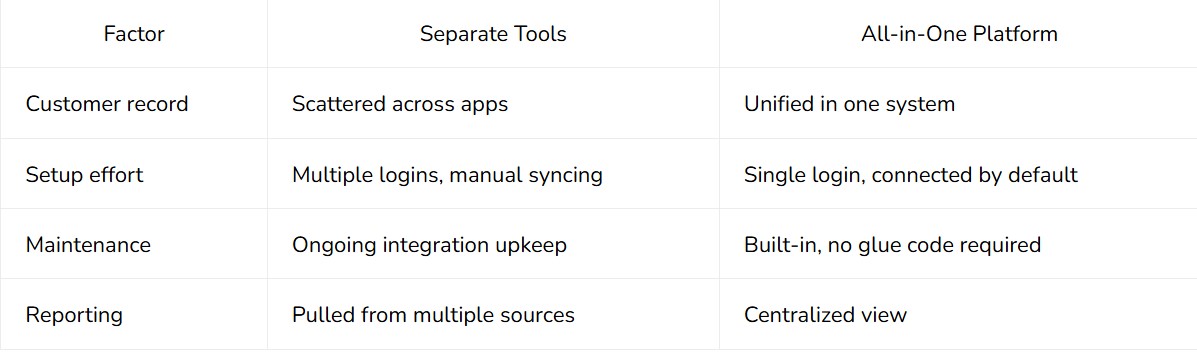
What Does "All-in-One" Actually Include?
The phrase covers a range of functions depending on the business need. For a service business evaluating all-in-one business software cost, the relevant question is which of these a single platform actually consolidates:
Lead capture and texting
Review requests and reputation tracking
Invoicing and payment collection
Scheduling and follow-up automation
Customer relationship records
We built our platform to cover each of those functions under one roof. Operations managers stop paying for and maintaining five separate systems that were never designed to talk to one another. To learn how we support these capabilities, see How Does SERTBO Simplify the Cost Equation?.
How Does All-in-One Business Software Cost Compare?
Separate software stacks charge separately for booking, invoicing, email, and support. One integrated platform rolls those costs into a single line. Businesses moving from five or six disconnected tools to one system report savings that exceed the cost of software subscriptions. That gap between a stitched-together stack and a unified platform defines the real all-in-one business software cost comparison small and medium-sized businesses face today.
A duct-taped stack hides its true price. Each vendor bills on its own schedule, at its own rate, and renews without warning. Tracking down what a business actually spends across six invoices eats hours every month, hours an operations manager rarely gets back. One integrated application replaces that patchwork and gives owners a clear, predictable view of what their software actually costs.
Why does consolidation lower the total bill?
Consolidation lowers the total bill because one platform eliminates the overlapping features separate vendors charge for individually. An all-in-one business platform combines the tools a company relies on daily — email, documents, tasks, goals, and data — into a single system with a single login and a single bill. Operations managers stop paying for redundant automation modules scattered across multiple subscriptions.

What does one login actually save a business?
One login means every core function a business runs on — scheduling, follow-up, payments, reporting — sits under a single bill instead of several. cite-1 That structure removes the hidden cost of reconciling charges across disconnected systems. Small business owners gain a software budget they can forecast, rather than one they discover after the fact.
What Hidden Costs Come With Stitching Tools Together?
Separate tools create a hidden tax that never shows up on an invoice. Every booking app, invoicing tool, and standalone CRM holds only a fragment of the customer record, and nothing links them automatically. Keeping those connections alive becomes an unplanned task that falls to whoever has the least spare time on a small team.
We see this gap show up first in lead response. Without automated call handling built into the stack, a missed call often means a lost lead because no one follows up fast enough. A connected platform sends an automatic text back before that lead moves on to a competitor, closing a gap that a disconnected phone system leaves wide open.
Review management carries the same hidden labor. Logging into one app to request feedback, another to read it, and a third to respond eats staff hours that never appear on a line item. Our platform lets reviews get requested, read, and answered from a single pocket-sized dashboard instead of three.
Does a Scattered Toolset Affect Customer Communication?
Yes. When conversations are split across SMS, Facebook, Instagram, and Google Chat, messages slip through the cracks. One combined inbox prevents that loss entirely, and we treat it as a baseline requirement rather than an upgrade.
What Is the Real All-in-One Business Software Cost Comparison?
The true all-in-one business software cost isn't the subscription line; it's the staff time spent gluing disconnected apps together. A stitched-together stack hides its price in missed leads, slow review turnaround, and buried messages. We price our platform to replace that invisible overhead, not add to it.
When Does Consolidation Not Make Sense?
Consolidation fails one specific business: the one already built around a single, best-in-class tool that handles the core of the work. A design studio running on Figma or an accounting firm structured entirely around Xero may not benefit from switching that centerpiece for a generic all-in-one substitute. Everything else in the stack is incidental; the core tool is the business.
Swapping a specialized, excellent tool for an adequate all-in-one replacement is a bad trade when that tool IS the work. We see this mistake often: owners chase the lower all-in-one business software cost without weighing the loss of capability. A cheaper monthly bill does not offset a weaker core product if that product is what clients actually pay for.
How Do We Know If Consolidation Fits a Business?
We start by mapping which tool a business cannot operate without. If that tool sits at the center of daily revenue-generating work, we recommend keeping it and integrating around it rather than replacing it.
A few signals tell us consolidation is the wrong call:
One tool already handles the majority of billable work at a high standard.
Switching would mean a measurable drop in output quality, not just a different interface.
The rest of the stack is minor by comparison: scheduling, invoicing, light reporting.
To discuss custom platform requirements or integration needs directly with our team, visit our Contact Us page.
Who Helps Business Owners Make This Call?
Our team at SERTBO, eleven people based in Fresno, California, works directly with business owners to evaluate their existing tool investment before recommending a full platform switch. We look at what already works before suggesting a change, not after. Follow our step-by-step guidance in What Should You Do Before Switching Platforms?.
How Does SERTBO Simplify the Cost Equation?
SERTBO collapses the all-in-one business software cost question into one bill, one login, and one app. Based in Fresno, California, we built this platform specifically for small and medium businesses ready to retire costly, disconnected software stacks. Separate subscriptions for texting, invoicing, review requests, and lead tracking add up fast. The hidden cost is rarely the invoice total. It's the hours spent reconciling data across five tools that were never designed to talk to each other.
Our app replaces that whole patchwork. Leads, texts, reviews, payments, and follow-up automation live in one connected system. The busywork runs itself, rather than eating up staff time every week.
What Does SERTBO's Platform Actually Replace?
Our app is built to retire the entire stack a growing business would otherwise cobble together piece by piece. Instead of licensing a booking tool, a separate texting app, a review platform, and a standalone invoicing system, operators consolidate those functions into:
Lead capture and tracking
Two-way texting and follow-up sequences
Review generation and reputation management
Payment collection and invoicing
Automated busywork that runs without manual triggers
Who Manages the Automation Behind the Scenes?
Our team of 11 employees supports every automation running inside the platform. Real staff work alongside AI to keep workflows accurate and responsive, rather than leaving businesses to troubleshoot bots alone. That combination matters for cost control: fewer tools mean fewer renewal dates, fewer logins, and fewer places where a customer record can fall through the cracks. For operations managers comparing a stitched-together stack to a unified system, the real savings show up less in the invoice and more in the time nobody has to spend gluing software together.
What Should You Do Before Switching Platforms?
Preparing for a platform switch starts with naming the one function, whether marketing, sales, support, or revenue operations, that causes the most friction today. Businesses that skip this step often consolidate the wrong systems first and end up paying for the mistake twice. We advise clients to run three checks before committing budget to any new stack.
Which Function Should We Unify First?
Start by mapping every tool currently touching the customer record. A platform can serve as an all-in-one solution for a single job, such as sales operations, while leaving other departments untouched. Picking the function with the most duplicated work, usually the one that costs staff the most hours of manual entry, gives the clearest return before evaluating the all-in-one business software cost against a stitched-together stack.
How Do We Know the Automation Actually Works?
We recommend testing the system in a live environment before migrating a single record. Texting a business directly and reading the automated reply shows the exact logic that platform will run on a real prospect, not a sales demo. cite-1 That one text reveals more about reliability than a vendor's feature list ever will.
Three checks we walk clients through before any migration:
Identify the bottleneck function causing the most duplicated manual work.
Test the live automation by messaging the vendor directly and reviewing the response.
Confirm single-login consolidation, meaning every function the business runs is reported in one trackable system rather than five disconnected logins.
Skipping any of these three steps risks paying for consolidation without getting the operational clarity that justifies it. We treat the single-login outcome — one system, one record, one bill — as the real measure of whether a switch succeeds.
FAQ
Why do all-in-one platforms cost less than separate tools?
One subscription replaces several separate fees for CRM, email automation, invoicing, and scheduling. Combining these into a single bill eliminates the duplicate billing cycles and multiple monthly charges that separate best-of-breed stacks require.
What hidden costs come with running separate software tools?
Beyond subscription fees, separate tools add an integration tax paid in staff hours spent on manual data entry, reconciling records, and dropped leads when platforms fail to sync with each other.
Who ends up maintaining the connections between disconnected apps?
Nobody officially owns this task on a small team. Staff ends up gluing six systems together as unpaid, unofficial work, re-entering the same customer details multiple times a day.
Conclusion
In closing, the choice between an all-in-one platform and separate business tools fundamentally depends on your operational priorities and budget constraints. Consolidating your systems reduces administrative overhead and streamlines workflows, while maintaining specialized tools preserves flexibility and targeted functionality. Evaluate your team's capacity, integration requirements, and growth trajectory to determine which approach delivers the greatest return on investment for your organization's unique needs.
